See where
everything stands.
Tell WeSimplifAI what you're tracking — or don't say anything at all. WeSimplifAI recognizes the stages your list needs, shows you the board before it's built, and builds it.
You know what you're tracking. You shouldn't have to build the board first.
You know what you're tracking — job applications, grant submissions, leads. What you shouldn't have to do is set up the tool before you can use it: naming the columns, deciding the stages, building the board from a blank canvas. Most project-management tools hand you an empty board and call the setup "quick."
A board that already matches how you're tracking this.
A working, staged board that already matches how you're actually tracking this — open it and start moving things forward, nothing left to configure. It's a single file that's yours to keep; it doesn't require an ongoing account to use once it exists.
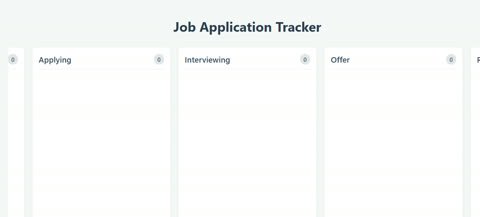
The example below shows this board exactly as generated — including its real starting state.
Recognition → Intent Discovery → Build → Verify
No blank board. Nothing you have to get right.
There's nothing to fill in to get started. If you want, add one short note about what you're tracking — WeSimplifAI recognizes what kind of board it needs from that, or, if you leave it blank, starts from a general starting structure — and shows you the proposed stages before building anything.
If what's being tracked is genuinely ambiguous, WeSimplifAI asks a real, specific clarifying question instead of guessing.
The structure is worked out per request — not matched to a template.
This isn't a keyword match against a fixed list of templates. The structure is worked out per request — which is also why WeSimplifAI can tell the difference between "I know exactly what this is" (and propose real stages) and "this is genuinely unclear" (and ask, rather than force a bad fit). The result is a single, self-contained board file — drag-and-drop, no setup screens, nothing else to install.
This is what WeSimplifAI actually builds.
Not a mockup — a real generated board from a real request.
One Capability Pack. Three AI providers.
This is the same board-building capability, without any capability-specific code changes, executed live and verified through Gemini, Claude, and OpenAI — 7 of 7 structural checks passed on each run. This isn't the broader claim that WeSimplifAI is model-agnostic everywhere; it's this specific, checkable result for this capability.
We don't compete on template count — or on team features we don't have.
All give you a blank board and the tools to build your own structure — you still decide the columns, name the stages, and set it up before it's useful.
Proposes the structure your list actually needs first, so there's nothing to configure. We don't compete with them on collaboration, integrations, or team permissions — this is built for tracking your own list, not running a shared team pipeline, and we say so plainly rather than pretending otherwise.
Your board is built. Now use it to actually run your search.
The hard part was never making a board — it's remembering to keep it honest as things change. Here's what changes once yours exists.
A quiet aside, not a pitch: when you log a new application you may also want a cover letter for it, and when a card moves to Interviewing or Offer, a follow-up email. WeSimplifAI builds both — worth knowing, not something this page is trying to sell you on right now.
Common questions
See where everything stands.
Tell WeSimplifAI what you're tracking. WeSimplifAI takes it from there.